Online mixing and mastering lets an artist in one country work with an engineer in another. You record your parts wherever you can, send the files and receive a mix and a master by download. For many artists, this is the practical way to work with a specific studio without travel.
The idea is simple. The details decide whether it goes well. This article explains how a remote project runs with Yave Rust Recordings in Richmond, Virginia, what you need to prepare and what you can expect at each stage.
Who online mixing and mastering suits
Remote work is a good fit when:
- you recorded in a home studio, a rehearsal space or another studio and want a mix elsewhere;
- your band or collaborators live in different cities or countries;
- you want a particular engineer's approach and travel is not practical;
- you have a release date and want a clear, file-based workflow.
It is less suitable when you still need to track drums or other instruments that require a professional room. In that case, consider recording locally and sending the tracks, or visit the studio. The article on remote production versus in-studio sessions compares those options.
The remote workflow, step by step
1. Send an inquiry
Everything begins with a conversation. You describe the project: the number of songs, genre, lineup, what has been recorded and what you want to achieve. The inquiry form on the website collects that information. The studio replies by email, discusses scope and confirms the next steps. There is no automated upload system on the website; file transfer is coordinated with you after the inquiry, so the method fits your project and file sizes.
2. Agree on scope
The scope states which stages are included (mixing, mastering or both), how many songs are covered, how many revision rounds are part of the project and the delivery formats. Agreeing on these points in advance protects both sides. If you need help estimating a budget, our guide to recording studio costs in Richmond explains what drives a quote.
3. Prepare your files
Clean preparation saves time and improves the result. Sound On Sound's guidance on exporting tracks for mixing is to start every exported file at bar one, beat one, so the engineer can line them up easily. It also advises exporting mono sources as mono files and stereo sources as stereo files, checking that each individual track stays under 0 dBFS true peak, and bouncing important aux send effects as separate labelled files so the engineer understands your intent. It treats all of this as convention, so ask your engineer about their preferences first. Following those principles:
- Export each track from bar one, beat one, including silent sections, so all files have the same length.
- Export at the original sample rate in 24-bit, as WAV or AIFF, unless the engineer asks for something else.
- Remove master-bus processing such as limiters and heavy compression, or send a version with and without.
- Leave plenty of headroom. Peaks that touch digital full scale mean clipping.
- Name tracks clearly, such as "Kick In", "Snare Top", "Gtr L" and "Lead Vocal".
- Print effects only if they are essential to the sound, and send a dry version as well when possible.
- Include a rough mix or reference so the engineer hears your intention, along with a tempo map, key and any session notes.
4. Share references and notes
Send two or three reference tracks with comments on what you like about each. Describe the mood you want, the elements that must stay prominent and anything you dislike about your rough mix. Specific notes, such as "the snare feels small in the chorus" or "keep the vocal dry and close", help more than general words like "big" or "warm".
5. Mixing
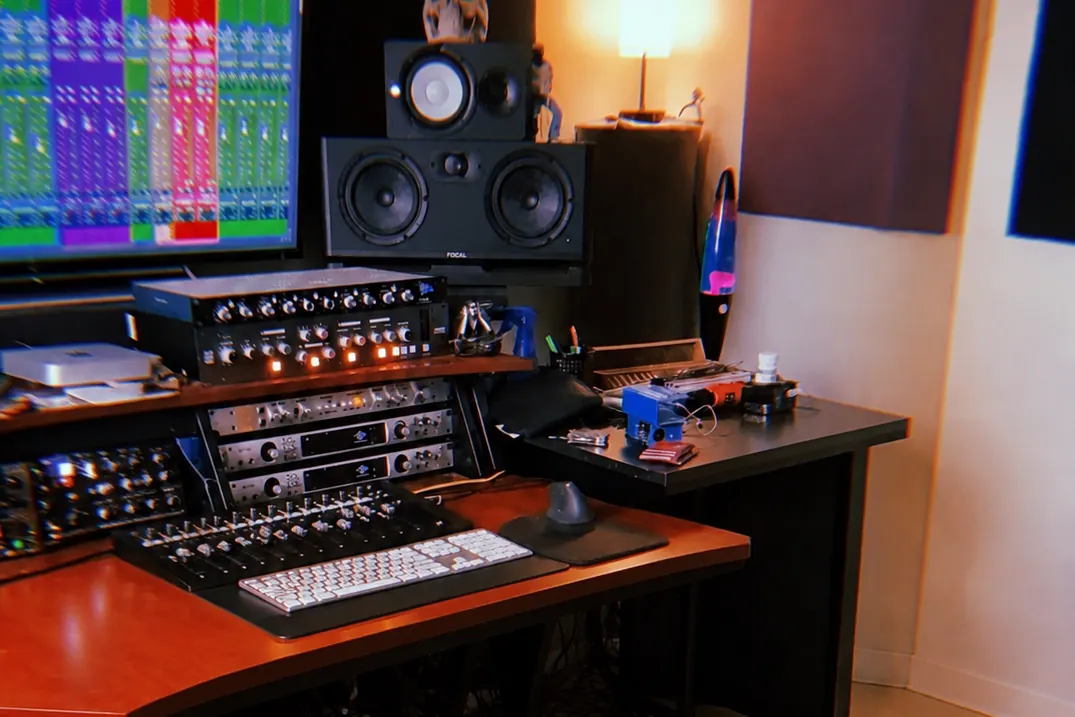
The engineer builds the mix from your tracks. That includes balance, EQ, dynamics, effects, editing where agreed and automation. Depending on the project and the stage, hardware may be used at points in the signal chain. The studio's website lists its equipment: API, SSL and Trident processors, Rupert Neve Designs 542 tape emulation modules, Focal Alpha Twin Evo and Yamaha HS5 monitors, a Universal Audio Apollo x6 interface and Pro Tools. The full inventory is on the gear section. Which tools are used depends on the song, and hardware is not guaranteed on every project.
6. Review and revisions
You receive a mix to listen to. Listen on several systems, take notes and send consolidated feedback with timestamps. Specific requests like "raise the lead vocal 1 dB in the second chorus" lead to quick, precise changes. Gather feedback from all band members into one message before sending it, so the engineer is not working from conflicting notes.
7. Mastering
After the mix is approved, the master is prepared. Mastering balances tone, dynamics and level and gets the file ready for distribution. The site credits mastering collaborations with Jack Control and Maor Applebaum at Enormous Door Mastering on released projects, with roles varying by release. Ask about the mastering plan for your project when you discuss scope. For a guide to the technical side, read mixing and mastering for Spotify and Apple Music.
8. Delivery
You receive the final files in the formats agreed. Typical deliverables are a high-resolution master and, where agreed, extra versions such as instrumentals or stems. Keep the originals archived.
How analog and digital tools fit into a remote mix
If you are curious about the signal path your mix will take, our article on analog vs. digital mixing explains the trade-offs between hardware and software tools. In short, the decision is made song by song, and the aim is the best result for your music, whatever the tool.
Common problems and how to avoid them
| Problem | Cause | Prevention |
|---|---|---|
| Tracks do not line up | Files exported from different start points | Export all tracks from the same start point |
| Distorted mix | Clipping in source files or on the master bus | Lower levels; remove master bus limiting before sending |
| Slow revisions | Feedback arrives in pieces from many people | Combine notes into one message |
| Mix feels different from the rough | Rough mix relied on heavy bus processing | Send the rough and explain what to keep |
| Surprises at delivery | Scope was not defined | Confirm stages, revisions and deliverables upfront |
Multitracks, stems or a stereo file?
The type of file you send determines which service you need.
Multitracks are the individual recorded tracks of a song. They give the mixing engineer full control and are the right starting point for a mix.
Stems are grouped submixes, for example all drums on one stereo file, all guitars on another. Stems limit what can be changed, but they can be a useful option when a session is very large or when the original session cannot be shared.
A stereo mix is a single file. It can be mastered, but it can no longer be rebalanced. If the mix is the problem, send multitracks instead.
If you are unsure which to send, describe your situation in the inquiry and the engineer will advise.
A short checklist before you send
- All tracks start at the same point and have the same length.
- Files are named clearly and grouped by instrument.
- No limiter or heavy processing on the master bus, or both versions supplied.
- Tempo, key, reference tracks and notes are included.
- You have agreed on scope, revisions and deliverables by email.
- Everyone in the band has approved the rough direction.
Communication across time zones
Remote work depends on clear communication. Because artists contact the studio from different time zones, email is the standard channel, and it is helpful to agree on how and when feedback is exchanged. A short plan at the start, such as when you expect the first mix and who gives feedback, keeps the project moving.
What a remote project cannot do
Online mixing starts from your recordings. If the drums were recorded in a small room with poor microphones, a mix can improve them but not rebuild them. Editing and sample reinforcement can help, but they have limits. If you are not sure about the quality of your recordings, send a short sample and discuss the options before committing. The article on choosing a studio in Richmond explains what makes a good recording environment, whether you are tracking at home or in a studio.
About Yave Rust Recordings
Yave Rust Recordings is a recording and mixing project based in Richmond, Virginia, working with artists around the world. The works section lists selected releases, with the role on each stated clearly, so you can listen to the work before getting in touch.
Frequently asked questions
How do I send my tracks?
Start by sending an inquiry with details about your project. The studio replies with the next steps, and file transfer is arranged with you at that point. The website does not have an automatic upload system.
What file format should I send?
Export each track as a WAV or AIFF at the original sample rate and in 24-bit if possible. Make sure every file starts from the same point.
How many revisions are included?
That depends on the agreed scope. Confirm the number of revision rounds and what happens if you need more before work begins.
Can you mix a track recorded in a home studio?
Yes, as long as the recordings are clean and well labeled. Send a sample first if you have concerns about quality, and the engineer can advise on the best approach.
Do I get hardware processing on my mix?
It depends on the project. The studio has analog equipment available, but its use is decided song by song, and it is not promised on every project.
References
- Q. How should I approach exporting tracks for mixing? — Matt Houghton, Sound On Sound (June 2026)
- Loudness normalization — Spotify Support
- Apple Digital Masters — Apple